
reading speed test (promo)
Best book notes:
“Singletons are classes which can be instantiated once, and can be accessed globally. This single instance can be shared throughout our application, which makes Singletons great for managing global state in an application.”
“With a
Proxyobject, we get more control over the interactions with certain objects. A proxy object can determine the behavior whenever we’re interacting with the object, for example when we’re getting a value, or setting a value.”
“JavaScript provides a built-in object called
Reflect, which makes it easier for us to manipulate the target object when working with proxies.”
“Proxies are a powerful way to add control over the behavior of an object. A proxy can have various use-cases: it can help with validation, formatting, notifications, or debugging”
“Overusing the Proxy object or performing heavy operations on each handler method invocation can easily affect the performance of your application negatively. It’s best to not use proxies for performance-critical code.”
“Provider Pattern. Make data available to multiple child components”
“The prototype pattern is a useful way to share properties among many objects of the same type. The prototype is an object that’s native to JavaScript, and can be accessed by objects through the prototype chain.”
“when we try to access a property that’s not directly available on the object, JavaScript recursively walks down all the objects that
__proto__points to, until it finds the property!”
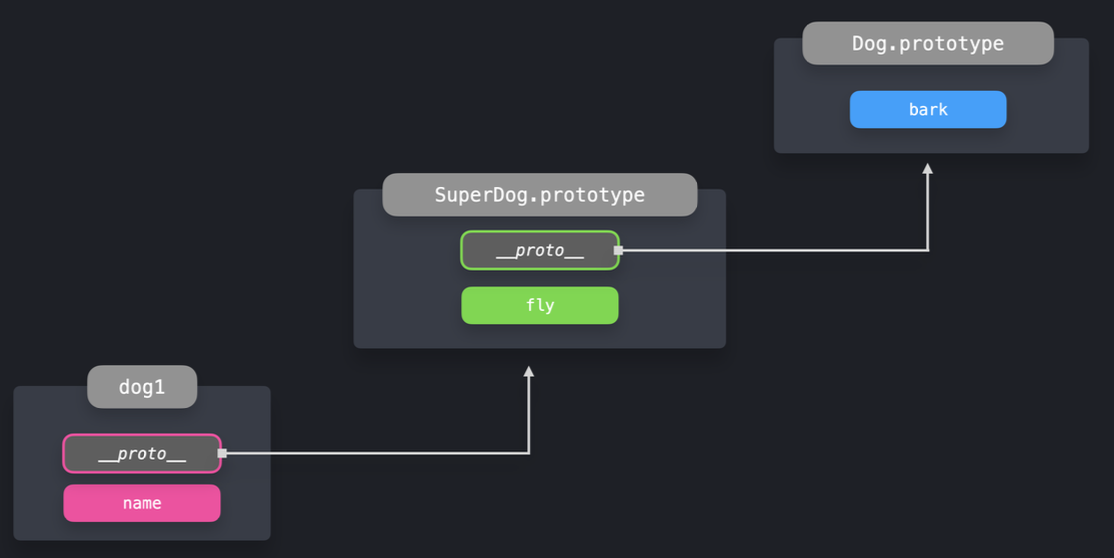
“The
Object.createmethod lets us create a new object, to which we can explicitly pass the value of its prototype.”
“Object.create is a simple way to let objects directly inherit properties from other objects, by specifying the newly created object’s prototype. The new object can access the new properties by walking down the prototype chain.”
“With the observer pattern, we can subscribe certain objects, the observers, to another object, called the observable. Whenever an event occurs, the observable notifies all its observers”
“An observable object usually contains 3 important parts: 1) observers: an array of observers that will get notified whenever a specific event occurs; 2) subscribe(): a method in order to add observers to the observers list; 3) unsubscribe(): a method in order to remove observers from the observers list: 4) notify(): a method to notify all observers whenever a specific event occurs”
“Pros. Using the observer pattern is a great way to enforce separation of concerns and the single responsiblity principle. The observer objects aren’t tightly coupled to the observable object, and can be (de)coupled at any time. The observable object is responsible for monitoring the events, while the observers simply handle the received data”
“Cons. If an observer becomes too complex, it may cause performance issues when notifying all subscribers.”
“A popular library that uses the observable pattern is RxJS.”
“As your application and codebase grow, it becomes increasingly important to keep your code maintainable and separated. The module pattern allows you to split up your code into smaller, reusable pieces.”
“ES2015 introduced built-in JavaScript modules.”
“A great benefit of having modules, is that we only have access to the values that we explicitly exported using the export keyword. Values that we didn’t explicitly export using the export keyword, are only available within that module.”
“With a default export, we can import the value without the brackets: import module from ‘module’.”
“Dynamic import. When importing all modules on the top of a file, all modules get loaded before the rest of the file. In some cases, we only need to import a module based on a certain condition. With a dynamic import, we can import modules on demand.”
“By dynamically importing modules, we can reduce the page load time. We only have to load, parse, and compile the code that the user really needs, when the user needs it.”
“A mixin is an object that we can use in order to add reusable functionality to another object or class, without using inheritance. We can’t use mixins on their own: their sole purpose is to add functionality to objects or classes without inheritance.”
“Use a central mediator object to handle communication between components”
“The mediator pattern makes it possible for components to interact with each other through a central point: the mediator. Instead of directly talking to each other, the mediator receives the requests, and sends them forward! In JavaScript, the mediator is often nothing more than an object literal or a function.”
“A good use case for the mediator pattern is a chatroom!”
“Render Props Pattern. Pass JSX elements to components through props”
“A render prop is a prop on a component, which value is a function that returns a JSX element. The component itself does not render anything besides the render prop. Instead, the component simply calls the render prop, instead of implementing its own rendering logic.”
“The cool thing about render props, is that the component that receives the prop is very reusable. We can use it multiple times, passing different values to the render prop each time.”
“React Hooks are functions that you can use to manage a components state and lifecycle methods. React Hooks make it possible to: 1) add state to a functional component; 2) manage a component’s lifecycle without having to use lifecycle methods such as componentDidMount and componentWillUnmount: 3) reuse the same stateful logic among multiple components throughout the app”
“The useEffect Hook is used to run code during major lifecycle events in a function component. The main body of a function component does not allow mutations, subscriptions, timers, logging, and other side effects”
“The useReducer Hook gives an alternative to useState and is especially preferable to it when you have complex state logic that involves multiple sub-values or when the next state depends on the previous one. It takes on a reducer function and an initial state input and returns the current state and a dispatch function as output by means of array destructuring. useReducer also optimizes the performance of components that trigger deep updates.”
“A Higher Order Component (HOC) is a component that receives another component. The HOC contains certain logic that we want to apply to the component that we pass as a parameter. After applying that logic, the HOC returns the element with the additional logic.”
“We can also compose multiple Higher Order Components.”
“HOCs can largely be replaced by React Hooks”
“Generally speaking, React Hooks don’t replace the HOC pattern. As the React docs tell us, using Hooks can reduce the depth of the component tree. Using the HOC pattern, it’s easy to end up with a deeply nested component tree”
“Best use-cases for a HOC: 1) The same, uncustomized behavior needs to be used by many components throughout the application. 2) The component can work standalone, without the added custom logic.”
“Best use-cases for Hooks: 1) The behavior has to be customized for each component that uses it. 2) The behavior is not spread throughout the application, only one or a few components use the behavior. 3) The behavior adds many properties to the componen”
“The flyweight pattern is a useful way to conserve memory when we’re creating a large number of similar objects.”
“With the factory pattern we can use factory functions in order to create new objects. A function is a factory function when it returns a new object without the use of the new keyword!”
“The compound pattern is great when you’re building a component library. You’ll often see this pattern when using UI libraries like Semantic UI.”
“We can also implement the Compound Component pattern by mapping over the children of the component”
“Pros. Compound components manage their own internal state, which they share among the several child components. When implementing a compound component, we don’t have to worry about managing the state ourselves.”
“Cons. When using the
React.children.mapto provide the values, the component nesting is limited. Only direct children of the parent component will have access to the open and toggle props, meaning we can’t wrap any of these components in another component.”
“With the Command Pattern, we can decouple objects that execute a certain task from the object that calls the method.”
speed reading practice (promo)
“Pros. The command pattern allows us to decouple methods from the object that executes the operation. It gives you more control if you’re dealing with commands that have a certain lifespan, or commands that should be queued and executed at specific times.”
“Cons. The use cases for the command pattern are quite limited, and often adds unnecessary boilerplate to an application.”
“TTFB - Time to First Byte - the time between clicking a link and the first bit of content coming in.”
“FP - First Paint - First time any content becomes visible to the user or the time when the first few pixels are painted on the screen”
“FCP - First Contentful Paint - Time when all the requested content becomes visible”
“LCP - Largest Contentful Paint - Time when the main page content becomes visible. This refers to the largest image or text block visible within the viewport.”
“TTI - Time to Interactive - Time when the page becomes interactive e.g., events are wired up, etc.”
“TBT - Total Blocking Time - The total amount of time between FCP and TTI.”
“Client-Side Rendering (CSR) and Server-Side Rendering (SSR) form the two extremes of the spectrum of choices available for rendering. The other patterns listed in the following illustration use different approaches to provide some combination of features borrowed from both CSR and SSR.”
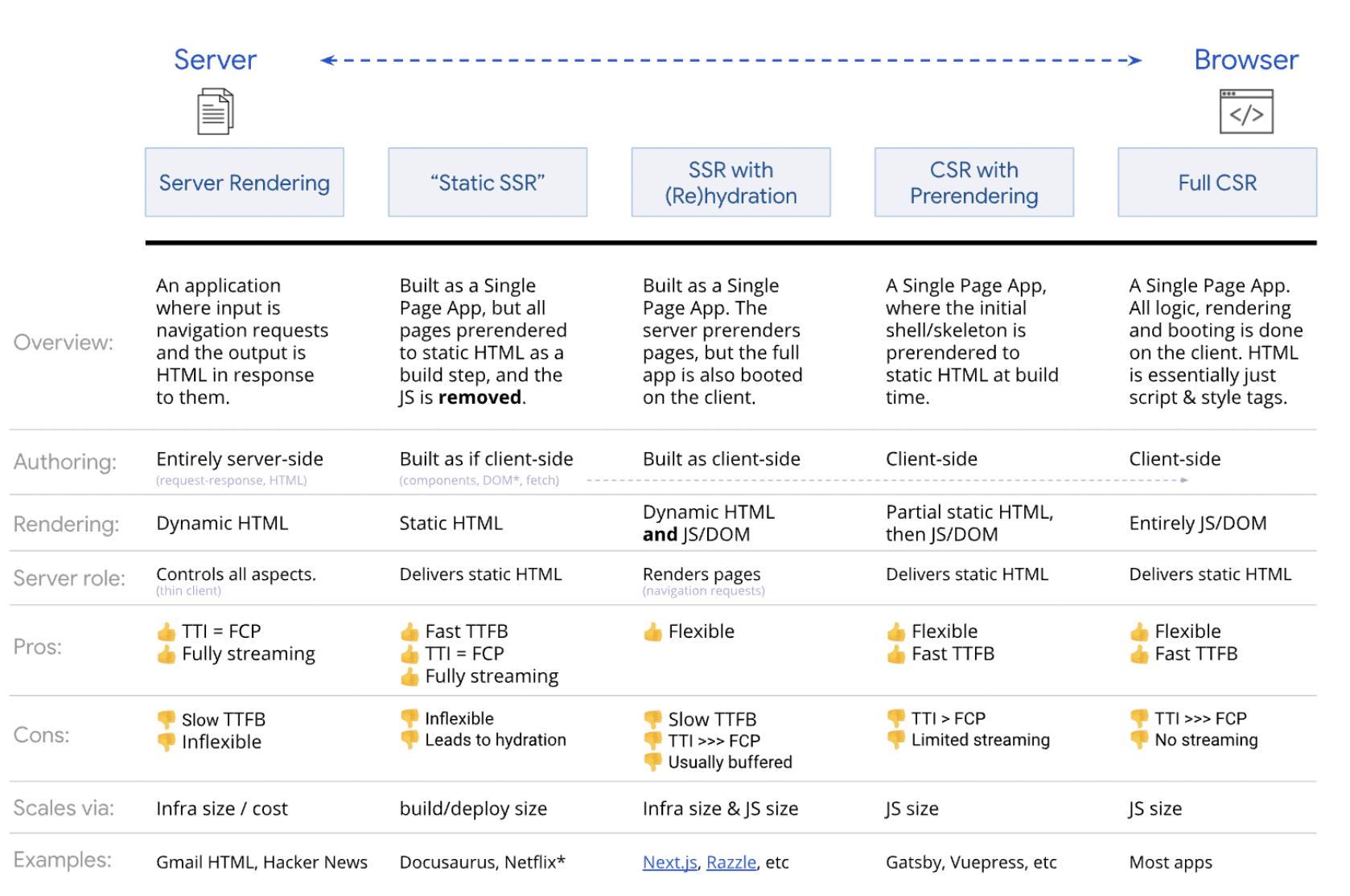
“By default, Next.js generates the HTML for each page in advance and not on the client-side. This process is called pre-rendering… This JavaScript code runs once the page loads. At this point, React JS works in a Shadow DOM to ensure that the rendered content matches with what the React application would render without actually manipulating it. This process is called hydration.”
"Next.js supports data fetching with both SSR and Static generation. Following functions in the Next.js framework make this possible. 1) getStaticProps (Used with Static generation to render data) 2) getStaticPaths (Used with Static generation to render dynamic routes) 3) getServerSideProps (Applicable to SSR)
“Next.js supports routing through the pages directory. Every .js file in this directory or its nested subdirectories becomes a page with the corresponding route. Next.js also supports the creation of dynamic routes using named parameters where the actual document displayed is determined by the value of the parameter.”
“Route-based: This is implemented by default in Next.js. When a user visits a route, Next.js only sends the code needed for the initial route. The other chunks are downloaded as required when the user navigates around the application.”
“Component-based: This type of code splitting allows splitting large components into separate chunks that can be lazy-loaded when required.”
“Preloading: This technique can be used to preload critical resources that would be required by the page, earlier in the page lifecycle. Critical resources may include JavaScript which can be preloaded by including the following directive in the <head> section of the HTML”
"Lazy loading: With lazy loading, you can identify resources that are noncritical and load these only when needed. "
"By progressively hydrating the application, we can delay the hydration of less important parts of the page. This way, we can reduce the amount of JavaScript we have to request in order to make the page interactive, and only hydrate the nodes once the user needs it. "
“Promotes code-splitting: Code-splitting is an integral part of progressive hydration because chunks of code need to be created for individual components that are lazy- loaded.”
“Reduces bundle size: Code-splitting automatically results in a reduction of bundle size. Less code to execute on load helps reduce the time between FCP and TTI.”
“React’s built-in renderToNodeStream makes it possible for us to send our application in smaller chunks. As the client can start painting the UI when it’s still receiving data, we can create a very performant first-load experience. Calling the hydrate method on the received DOM nodes will attach the corresponding event handlers, which makes the UI interactive!”
“Like progressive hydration, streaming is another rendering mechanism that can be used to improve SSR performance. As the name suggests, streaming implies chunks of HTML are streamed from the node server to the client as they are generated. As the client starts receiving “bytes” of HTML earlier even for large pages, the TTFB is reduced and relatively constant. All major browsers start parsing and rendering streamed content or the partial response earlier. As the rendering is progressive, it results in a fast FP and FCP. Streaming responds well to network backpressure. If the network is clogged and not able to transfer any more bytes, the renderer gets a signal and stops streaming till the network is cleared up. Thus, the server uses less memory and is more responsive to I/O conditions. This enables your Node.js server to render multiple requests at the same time and prevents heavier requests from blocking lighter requests for a long time. As a result, the site stays responsive even in challenging conditions.”
“The React team are working on zero-bundle-size React Server Components, which aim to enable modern UX with a server-driven mental model. This is quite different to Server-side Rendering (SSR) of components and could result in significantly smaller client-side JavaScript bundles.”
“Server Components are not a replacement for SSR. When paired together, they support quickly rendering in an intermediate format, then having Server-side rendering infrastructure rendering this into HTML enabling early paints to still be fast. We SSR the Client components which the Server components emit, similar to how SSR is used with other data-fetching mechanisms.”
“Some of the challenges with code-splitting are: 1) Outside of a meta-framework (like Next.js), you often have to tackle this optimization manually, replacing import statements with dynamic imports. 2) It might delay when the application begins loading the component impacting the user-experience.”
“Server Components introduce automatic code-splitting treating all normal imports in Client components as possible code-split points. They also allow developers to select which component to use much earlier (on the server), allowing the client to fetch it earlier in the rendering process.”
“Will Server Components replace Next.js SSR? No. They are quite different. Initial adoption of Server Components will actually be experimented with via meta-frameworks such as Next.js as research and experimentation continue.”
“To summarize a good explanation of the differences between Next.js SSR and Server Components from Dan Abramov: 1) Code for Server Components is never delivered to the client. In many implementations of SSR using React, component code gets sent to the client via JavaScript bundles anyway. This can delay interactivity. 2) Server components enable access to the back-end from anywhere in the tree. When using Next.js, you’re used to accessing the back-end via getServerProps() which has the limitation of only working at the top-level page. Random npm components are unable to do this. 3) Server Components may be refetched while maintaining Client-side state inside of the tree. This is because the main transport mechanism is much richer than just HTML, allowing the refetching of a server-rendered part (e.g such as a search result list) without blowing away state inside (e.g search input text, focus, text selection)”
“Streaming rendering allows you to start streaming components as soon as they’re ready, without risking a slower FCP and TTI due to components that might take longer to generate on the server.”
“Components can be hydrated as soon as they’re streamed to the client, since we no longer have to wait for all JavaScript to load to start hydrating and can start interacting with the app before all components have been hydrated.”
“Next.js by Vercel is a React meta-framework that enhances the React development experience. It enables the creation of production-ready apps and supports static site generation and server-side rendering, easy configuration, fast refresh, image optimization, file-system routing, and optimized codesplitting and bundling.”
“We used the LazyLoadingErrorBoundary component which acts as a wrapper for react lazy and react suspense. This ensures that the menu component is loaded after page load”
“Preconnects allow you to provide hints to the browser on what resources are going to be required by the page shortly. Adding “rel=preconnect” informs the browser that the page will need to establish a connection to another domain so that it can start the process sooner. The hints help to load resources quicker because the browser may have already set up the connection by the time the resources are required.”
“Even though it is one of the recommended approaches for reducing CLS, setting image dimensions did not work so well as the aspect ratio technique that we finally implemented.”
“Tried out server-side rendering to reduce LCP but it brought about regression rather than improvement. This could be because the movie-related data and images required to render pages were fetched through TMDB API calls. This caused the server response to be slow because all API requests/responses were processed on the server.”
“islands architecture encourages small, focused chunks of interactivity within server-rendered web pages. The output of islands is progressively enhanced HTML, with more specificity around how the enhancement occurs. Rather than a single application being in control of full-page rendering, there are multiple entry points. The script for these “islands” of interactivity can be delivered and hydrated independently, allowing the rest of the page to be just static HTML.”
“Pros and Cons. The Islands architecture combines ideas from different rendering techniques such as server-side rendering, static site generation, and partial hydration. Some of the potential benefits of implementing islands are as follows. 1) Performance: Reduces the amount of JavaScript code shipped to the client. The code sent only consists of the script required for interactive components, which is much less than the script needed to recreate the virtual DOM for the entire page and rehydrate all the elements on the page. The smaller size of JavaScript automatically corresponds to faster page loads and Time to Interactive (TTI). 2) SEO: Since all of the static content is rendered on the server; pages are SEO friendly. 3) Prioritizes important content: Key content (especially for blogs, news articles, and product pages) is available almost immediately to the user. Secondary functionality for interactivity is usually required after consuming the key content becomes available gradually. 4) Accessibility: The use of standard static HTML links to access other pages helps to improve the accessibility of the website. 5) Component-based: The architecture offers all advantages of component-based architecture, such as reusability and maintainability.”
“Despite the advantages, the concept is still in a nascent stage. The limited support results in some disadvantages. 1) The only options available to developers to implement Islands are to use one of the few frameworks available or develop the architecture yourself. Migrating existing sites to Astro or Marko would require additional efforts. 2) Besides Jason’s initial post, there is little discussion available on the idea. 3) New frameworks claim to support the Islands architecture making it difficult to filter the ones which will work for you. 4) The architecture is not suitable for highly interactive pages like social media apps which would probably require thousands of islands.”
"Key metrics such as First Content Paint, Largest Contentful Paint, First Input Delay, etc used to measure performance are directly dependent on the loading sequence of critical resources. "
“Critical CSS refers to the minimum CSS required for FCP. It is better to inline such CSS within HTML rather than import it from another CSS file. Only the CSS required for the route should be downloaded at any given time and all critical CSS should be split accordingly.”
“If inlining is not possible, critical CSS should be preloaded and served from the same origin as the document. Avoid serving critical CSS from multiple domains or direct use of 3rd party critical CSS like Google Fonts. Your own server could serve as a proxy for 3rd party critical CSS instead.”
“Delay in fetching CSS or incorrect order of fetching CSS could impact FCP and LCP. To avoid this, non-inlined CSS should be prioritized and ordered above 1P JS and ABT images on the network.”
“Too much inlined CSS can cause HTML bloating and long style parsing times on the main thread. This can hurt the FCP. As such identifying what is critical and code-splitting are essential.”
“Inlined CSS cannot be cached. One workaround for this is to have a duplicate request for the CSS that can be cached. Note however, that this can result in multiple full-page layouts which could impact FID.”
“Like critical CSS, the CSS for critical fonts should also be inlined.”
“Above the Fold (ABT) Images. This refers to images that are initially visible to the user on page load because they are within the viewport. A special case for ABT images is the hero image for the page. All ABT images should be sized. Unsized images hurt the CLS metric because of the layout shift that occurs when they are fully rendered. Placeholders for ABT images should be rendered by the server. Delayed hero image or blank placeholders would result in a late LCP. Moreover, LCP will re-trigger, if the placeholder size does not match with the intrinsic size of the actual hero image and the image is not overlaid on replacement. Ideally, there should be no impact on FCP due to ABT images but in practice, an image can fire FCP.”
“Below the Fold (BTF) Images. These are images that are not immediately visible to the user on page load. As such they are ideal candidates for lazy loading. This ensures that they do not contend with 1P JS or important 3P needed on the page. If BTF images were to be loaded before 1P JS or important 3P resources, FID would get delayed.”
“1P JavaScript. 1P JS impacts the interaction readiness of the application. It can get delayed on the network behind images & 3P JS and on the main thread behind 3P JS. As such it should start loading before ABT images on the network and execute before 3P JS on the main thread. 1P JS does not block FCP and LCP in pages that are rendered on the server-side”
“3P JavaScript. 3P sync script in HTML head could block CSS & font parsing and therefore FCP. Sync script in the head also blocks HTML body parsing. 3P script execution on the main thread can delay 1P script execution and push out hydration and FID. As such, better control is required for loading 3P scripts.”
"Since the components were statically imported, Webpack bundled the modules into the initial bundle. "
“An easy way to dynamically import components in React is by using React Suspense. The React.Suspense component receives the component that should be dynamically loaded”
“A good alternative to React Suspense is the loadable-components library, which can be used in SSR applications.”
“In order to know whether components are currently in our viewport, we can use the IntersectionObserver API, or use libraries such as react-lazyload or react-loadable-visibility to quickly add import on visibility to our application.”
“The different ways to load resources are, at a high-level: 1) Eager: load resource right away (the normal way of loading scripts) 2) Lazy (Route-based): load when a user navigates to a route or component; 3) Lazy (On interaction): load when the user clicks UI (e.g Show Chat); 4) Lazy (In viewport): load when the user scrolls towards the component; 5) Prefetch: load prior to needed, but after critical resources are loaded; 6) Preload: eagerly, with a greater level of urgency”
“Import-on-interaction for first-party code as part of progressive loading”
“For a long time, we used HTTP/1.1 in order to communicate between the client and the server. Although HTTP/1.1 introduced many improvement compared to HTTP/1.0, such as being able to keep the TCP connection between the client and the server alive before a new HTTP requests gets sent with the keep-alive header, there were still some issues that had to be solved!”
“Whereas HTTP/1.1 used a newline delimited plaintext protocol in the requests and responses, HTTP/2 splits the requests and responses up in smaller pieces called frames. An HTTP request that contains headers and a body field gets split into at least two frames: a headers frame, and a data frame!”
“HTTP/1.1 had a maximum amount of 6 TCP connections between the client and the server. Before a new request can get sent over the same TCP connection, the previous request has to be resolved! If the previous request is taking a long time to resolve, this request is blocking the other requests from being sent. This common issue is called head of line blocking, and can increase the loading time of certain resources!”
“HTTP/2 makes use of bidirectional streams, which makes it possible to have one single TCP connection that includes multiple bidirectional streams, which can carry multiple request and response frames between the client and the server!”
“HTTP/2 solves head of line blocking by allowing multiple requests to get sent on the same TCP connection before the previous request resolves!”
“Preloading is a great way to optimize the time it takes to load resources that are critical for the current route.”
“Tree shaking is aimed at removing code that will never be used from a final JavaScript bundle. When done right, it can reduce the size of your JavaScript bundles and lower download, parse and (in some cases) execution time.”
“Only modules defined with the ES2015 module syntax (import and export) can be tree-shaken. The way you import modules specifies whether the module can be tree-shaken or not.”
"Preload (
<link rel="preload">) is a browser optimization that allows critical resources (that may be discovered late) to be to be requested earlier. "
“If you are trying to optimize the loading of first-party JavaScript, you can also consider using
<script defer>in the document<head>vs.<body>to help with early discover of these resources.”
“Webpack 4.6.0+ allows preloading of resources by adding
/* webpackPreload: true */to the import.”
“Preload + the async hack. Should you wish for browsers to download a script as high-priority, but not block the parser waiting for a script, you can take advantage of the
preload+asynchack below. The download of other resources may be delayed by the preload in this case, but this is a trade-off a developer has to make:”
“You may also find
<link rel="preload">to be helpful for cases where you need to fetch scripts without executing them.”
“Modules that are prefetched are requested and loaded by the browser even before the user requested the resource. When the browser is idle and calculates that it’s got enough bandwidth, it will make a request in order to load the resource, and cache it. Having the resource cached can reduce the loading time significantly, as we don’t have to wait for the request to finish after the user has clicked the button. It can simply get the loaded resource from cache.”
focus timer (promo)


No comments:
Post a Comment